XwiftHQ Finance

Close the books with confidence. Every month.

Run your general ledger, banking and reconciliation, spend-to-pay (payment vouchers and withholding tax included), revenue and receivables, budgets, project funds and fixed assets in one place. Payroll, purchases and trips post to the same books, so month-end is a review, not a rebuild.

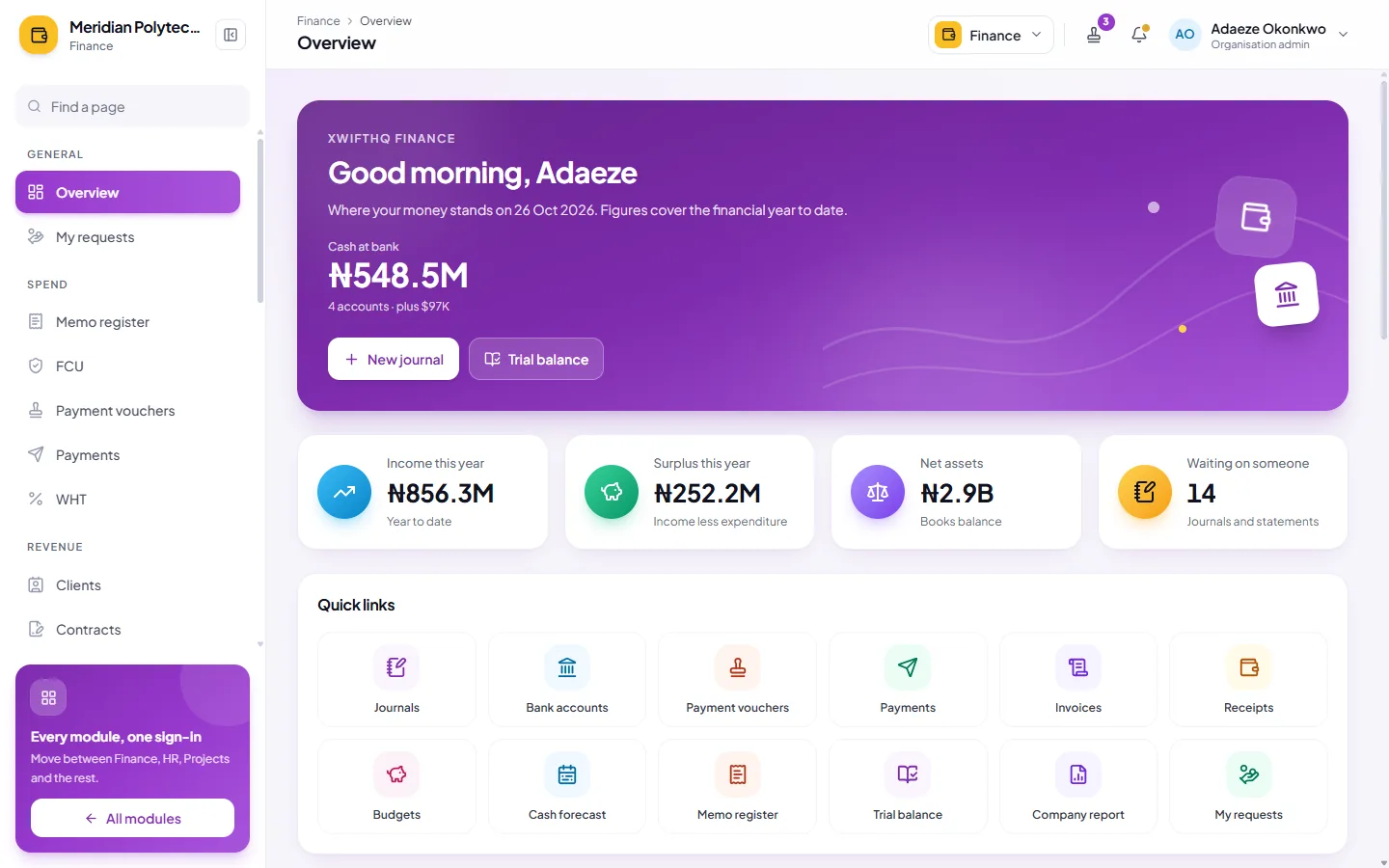
Finance overview: cash at bank, income and surplus for the year, net assets and work waiting

Why finance teams choose XwiftHQ

Facts about how the module is built, each one something you can check in the product.

Financial statementsTrial balance, income statement, financial position and cash flow
4
Spend to payControl checks, voucher, WHT, schedule and bank file
Memo → bank
Project fundsBudgets, tranche releases and commitments
By month
Company reportEvery analysis for a period, down to the requester
PDF + Excel

What it does

Everything the money side needs, built in

One ledger, one way to approve, every project's money in view, and a close that never relies on someone's memory.

Books that actually close

Start from a chart-of-accounts template. Post journals, set the repeating ones to recur, and lock each period when you close it. Your trial balance, income statement, financial position and cash flow come straight from posted entries.

Every payment checked first

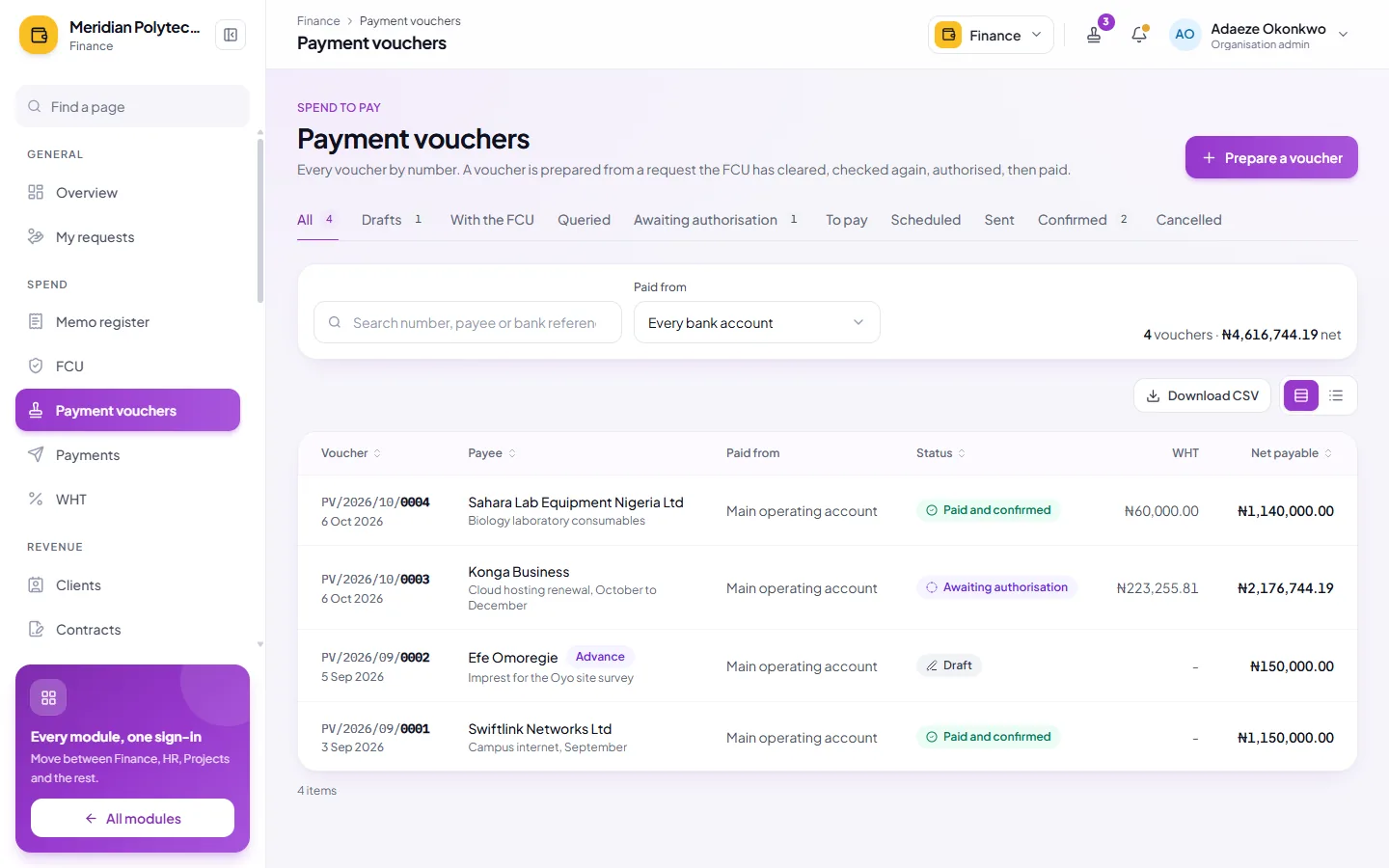
Payment and advance memos clear the finance control unit's checks, then become payment vouchers with withholding tax worked out. They leave as a payment schedule and a bank file. Advances get retired against receipts, never forgotten.

Reconciliation that runs on your rules

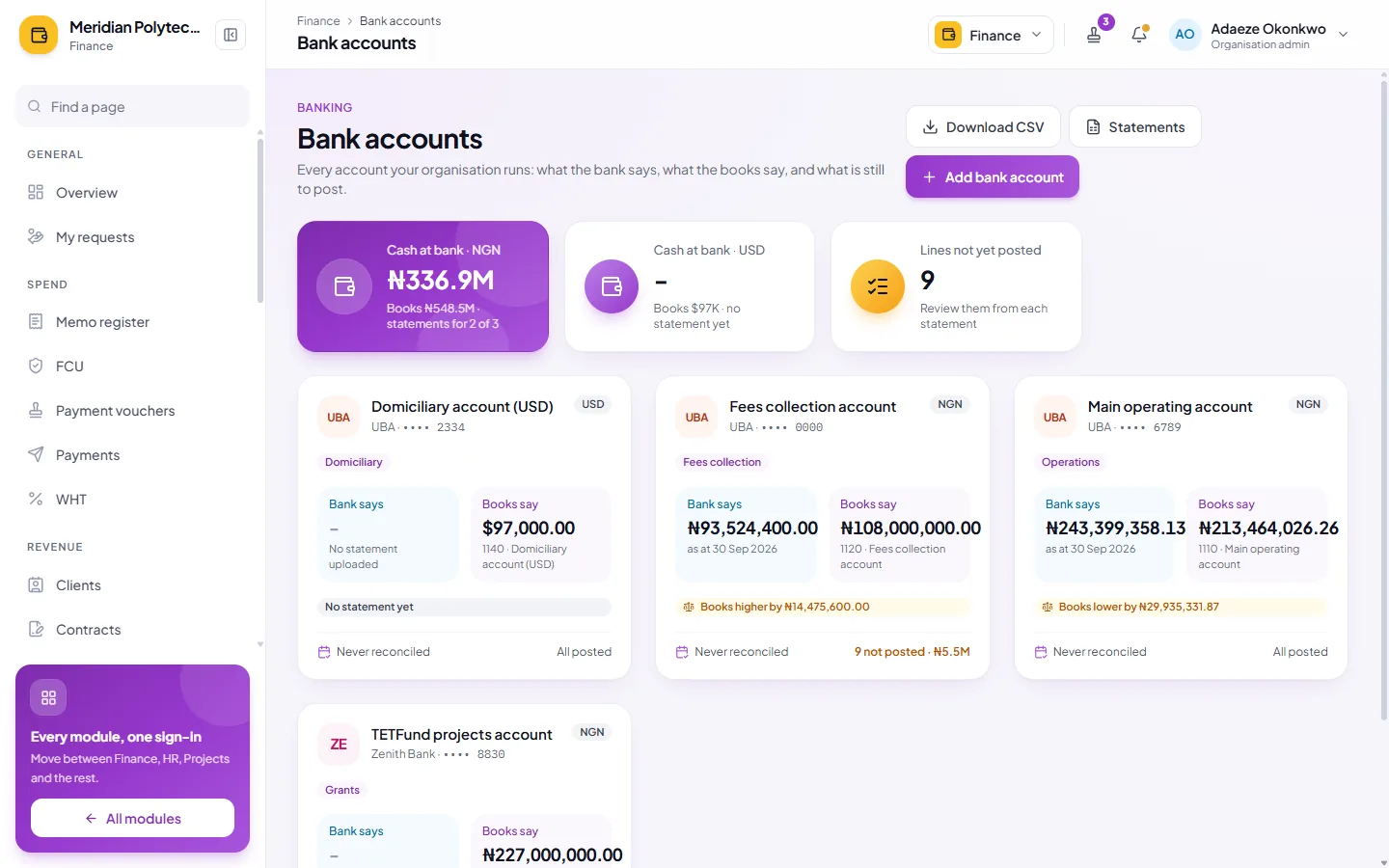
Import a bank statement and let your own rules match the obvious lines. You review only what's left. Reconciliation reports show what was matched, who matched it and what's still open.

Project funds, kept in check

Give each project a budget by category and month, released in tranches. Commitments count the moment a purchase or trip is approved, so no project can spend money it was never released.

Budgets that push back

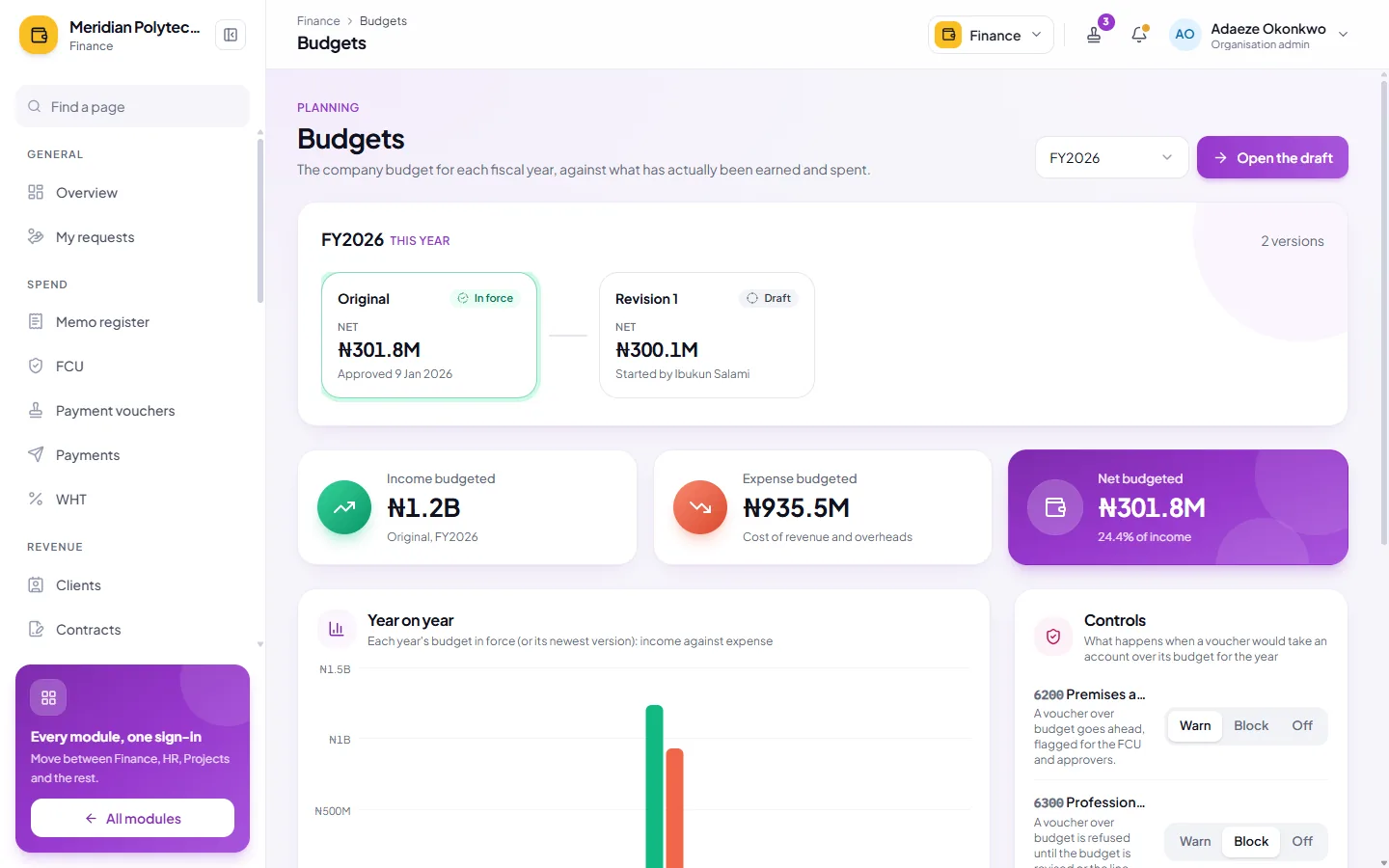
Budget controls warn on, or block, any voucher that would overrun its line. The cash forecast reads the same commitments, so the money you expect to need is the money you planned.

One report, the whole company

Print the company finance report as a PDF on your letterhead with a QR check, or take it as Excel. It covers every analysis for a period, right down to who raised each request.

Inside the product

The screens your finance team works in

Captured from a demo company's real books. Pick a screen to see what it does.

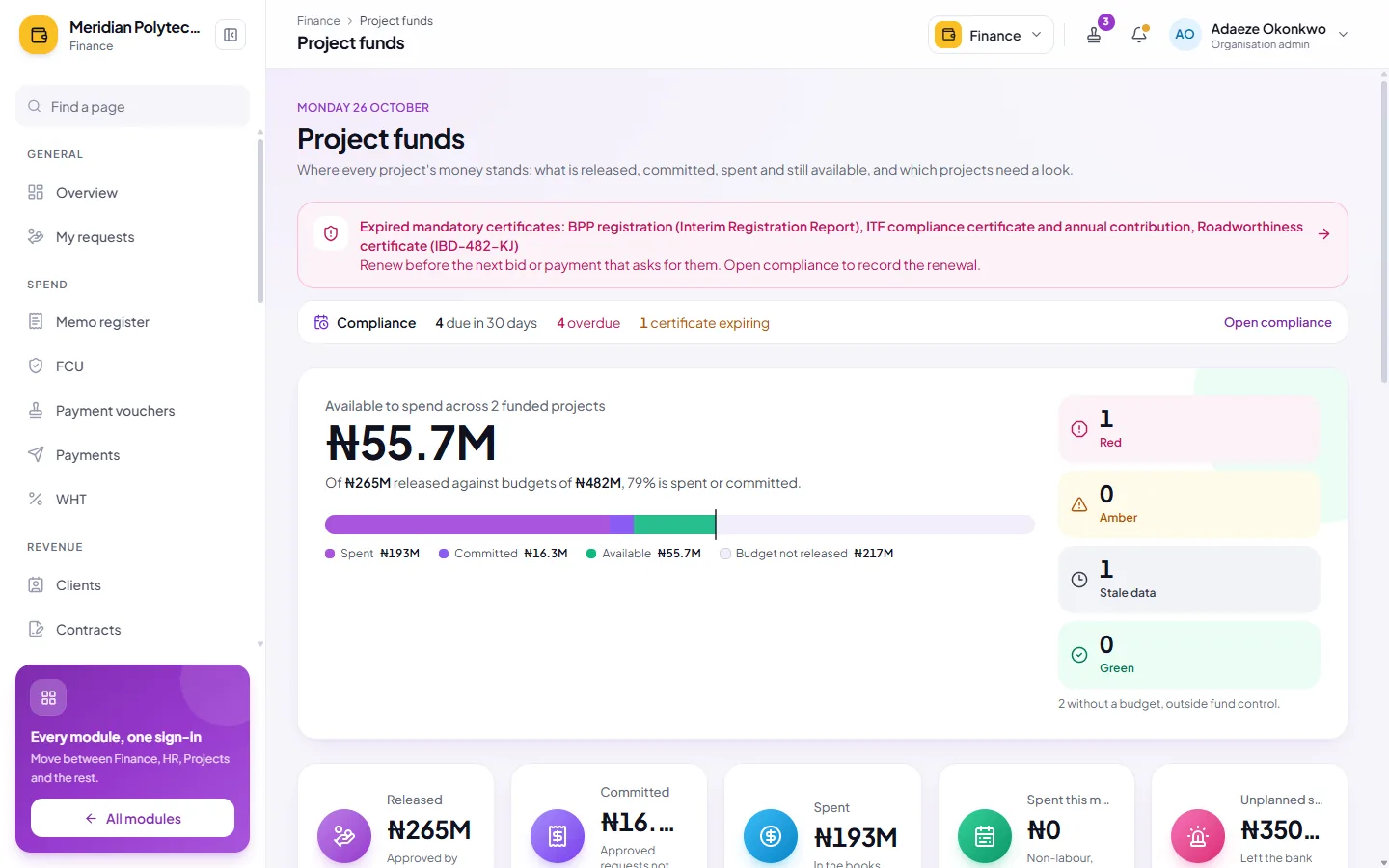
Project funds

Every project's money on one screen

Budget, released, committed, spent and still available for each project, with a status colour and earned value for leadership.

Project funds: released, committed, spent and available across every project

New in Finance

Every project reconciled. One report for the company.

Each project now shows its expected spend beside its actual, and the whole company's finances print as one document.

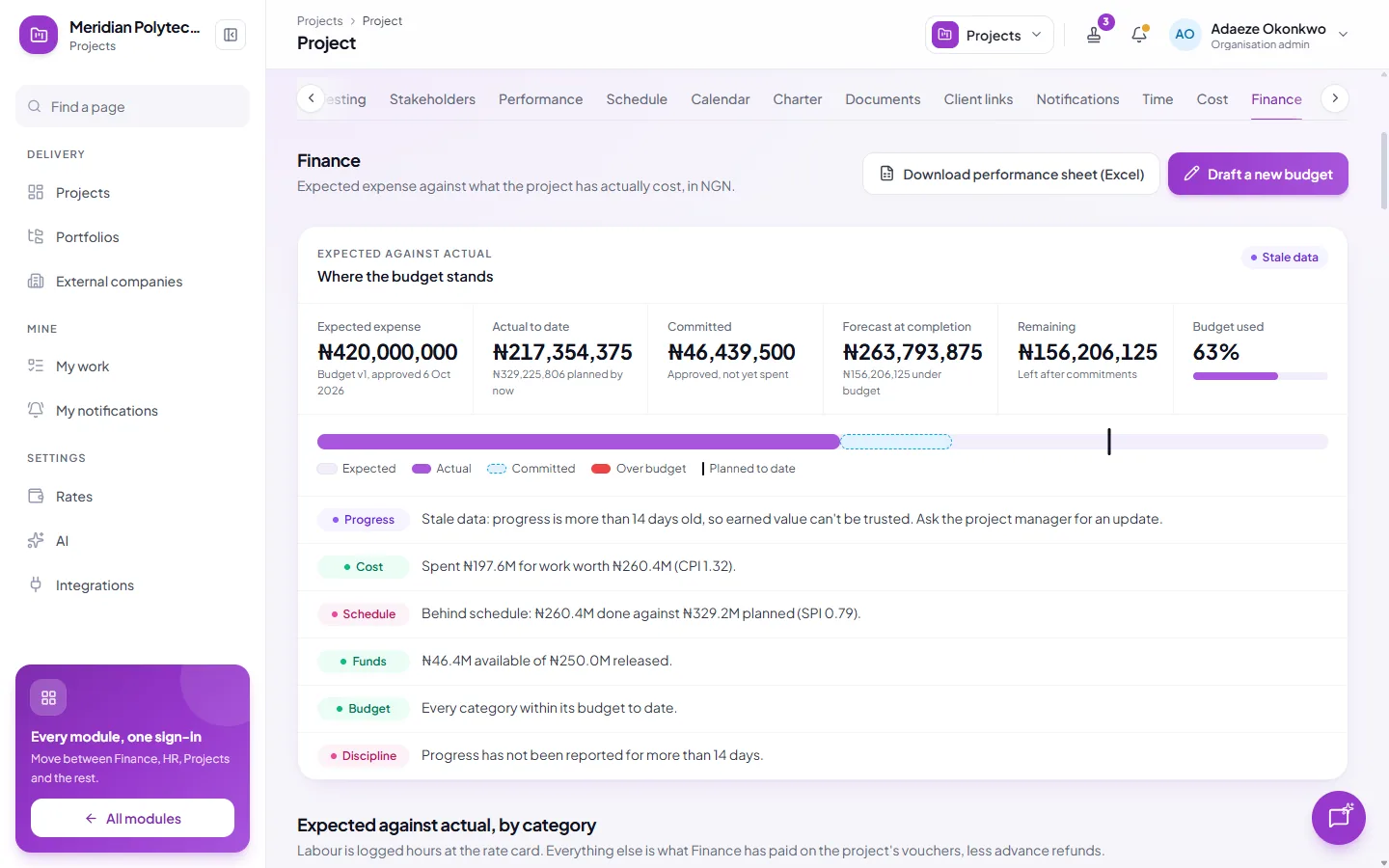
On the project itself

Expected spend beside actual

The approved project budget is the expected spend. Next to it sits what the project really used: labour at each person's rate, travel, workshops, purchases and memos. The project manager sees a gap long before leadership does.

  • Labour costed from logged hours at each person's rate card
  • Travel, workshops, purchases and memos counted once, by category
  • Project managers draft and submit the budget from the project
  • Money is shown only to people allowed to see cost
Expected expense against actual, on the project itself

For the board

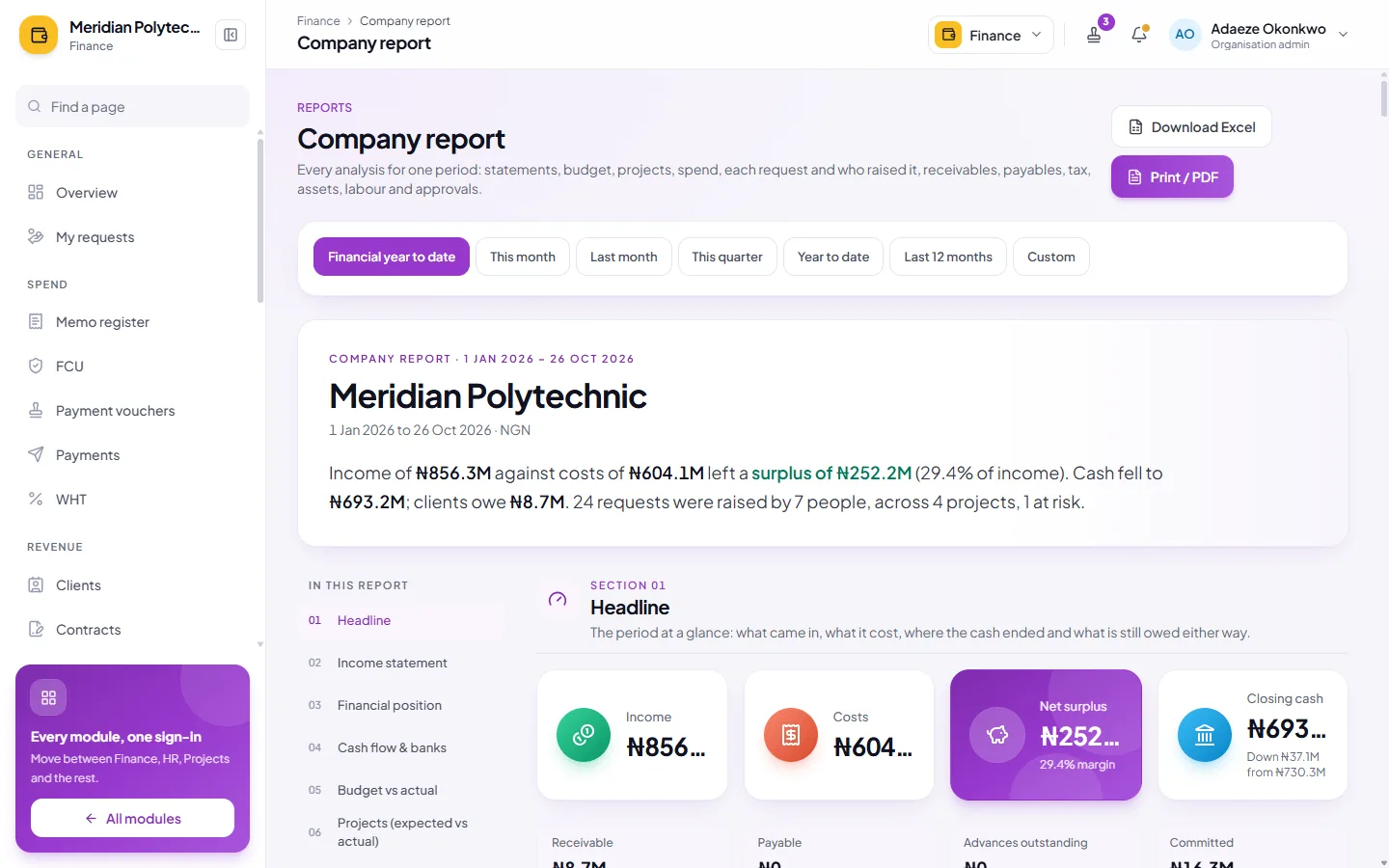
The company finance report

Choose a period and get every analysis in one place: the statements, budget against actual, each project, spend by category, cost centre and payee, and every request with the name of whoever raised it.

  • Receivables, payables, advances, tax, assets, labour and approvals
  • Spend counted once, whichever module recorded it
  • A branded PDF with a QR code to verify it, or an Excel workbook
The company finance report: every analysis for a period, printable

The case

Finance hears about everything last

In most companies, the ledger is the last system to hear about anything. Payroll turns up as a spreadsheet after the run. A purchase turns up as an email thread with an invoice attached. A trip advance is agreed on WhatsApp and never retired. None of it is quite wrong. It is late, retyped, and one typo away from wrong. And nobody can tell you today what a single project has actually cost.

Run people, projects, purchasing and the books in one suite and nothing arrives late, because nothing ever lived anywhere else. HRM posts the payroll journal by cost centre. A purchase, trip or workshop approved in Admin & Operations is committed against the project's funds the moment it is approved. Every payment moves from memo to control checkpoint to voucher to bank file, then is confirmed against the statement line.

So the audit trail leads back to the action behind each entry, not the person who typed it in. And every project's expected spend sits right beside what it actually spent. Stop reconciling your ledger. Start reading it.
How it works

From the chart of accounts to the bank line

Four parts of the module, and what each one does when money is requested, spent or received.

Part 01

A ledger, and a month-end close that is just a review

Start from a chart-of-accounts template and adjust it, so you never face a blank page. Journals carry their source document, recurring journals post themselves, and accruals reverse on the first day of the next period without anyone having to remember.

Periods close in two steps: soft-closed while the last adjustments land, then locked. Payroll arrives from HRM as a journal by cost centre, and every statement drills down to the entry behind each figure.

  • Chart-of-accounts templates, cost centres and dimensions, set in the organisation console
  • Manual, recurring and auto-reversing journals, each with its source document
  • Soft close and lock for every period. Locked means locked
  • Trial balance, income statement, financial position, cash flow and cash position
  • Import bank statements from PDF or CSV, classify them by rules, and reconcile with a printable report
  • Payroll journal posted from HRM by cost centre, and paid through Finance

Part 02

Spend to pay, with a control at every step

Every payment that leaves your company starts as a payment or advance memo, charged to a project or cost centre. The finance control unit clears it against a checklist. A payment voucher is raised with a gap-free number and the withholding tax worked out. Treasury then pays it from an approved schedule and bank file.

A payment is final only once it is confirmed against the imported bank statement. Advances are retired with receipts, ageing commitments expire, and urgent spend made before approval is regularised after the fact, not hidden.

  • Payment and advance memos, finance control unit checkpoints and payment vouchers
  • Payment schedules with a second approver, plus a bank file ready to upload
  • Confirmation against the statement line, then advances retired
  • Separation of duties enforced, and post-facto regularisation with a recorded reason
  • Withholding tax remittances and supplier certificates, straight from the same vouchers
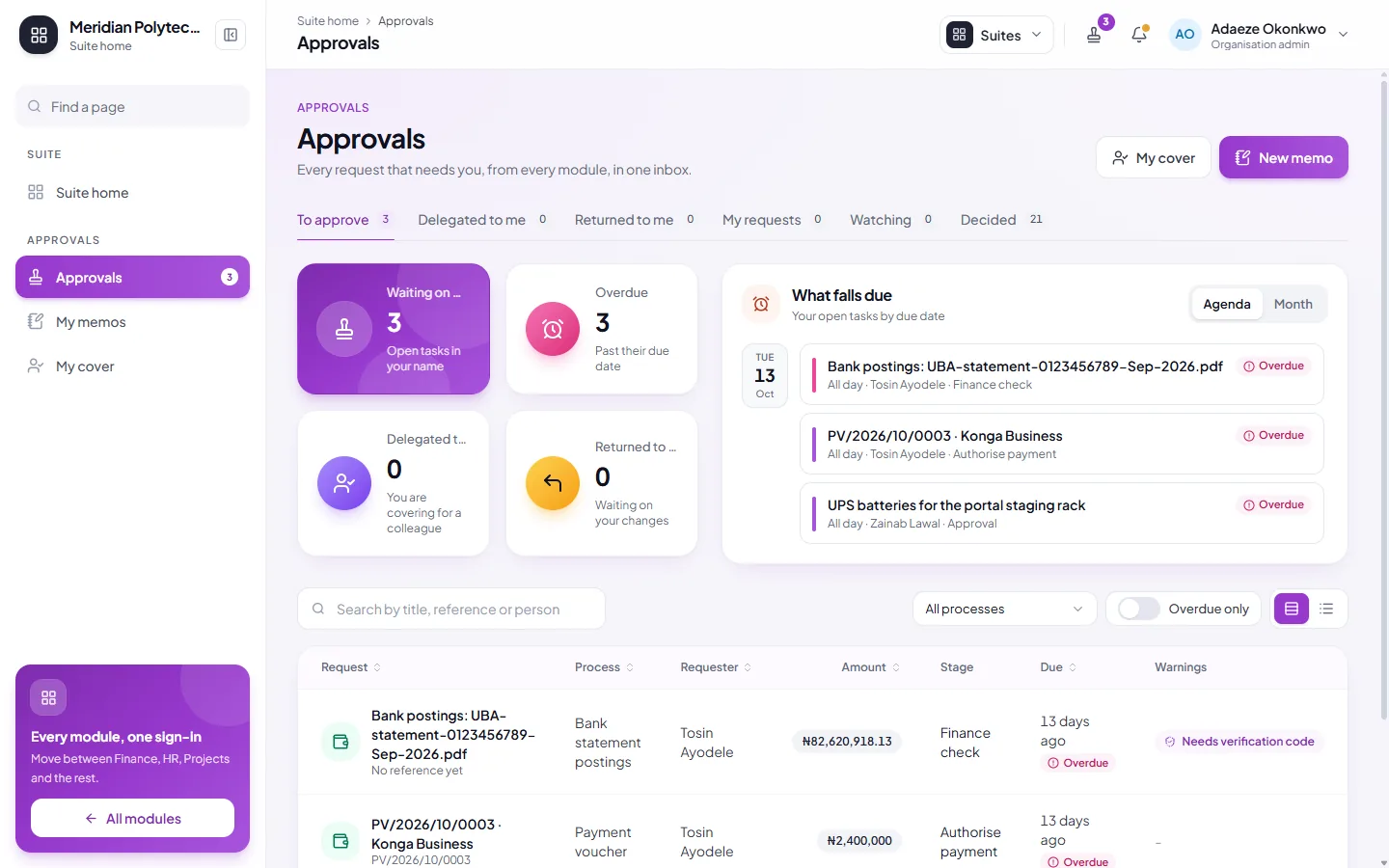
  • Step-up authentication via an authenticator app for high-value approvals

Spend to pay

From memo to bank line

Six stages · three controls
  1. 1

    Payment or advance memo

    Requester · line approver

    Charged to a project or cost centre, with funds checked before approval.

  2. 2

    Finance control unit checkpoints

    Control

    FCU officer

    An item-by-item checklist against the memo and its papers.

  3. 3

    Payment voucher

    Control

    Finance

    Gap-free number, withholding tax worked out, and the accrual posted on approval.

  4. 4

    Payment schedule and bank file

    Treasury · second approver

    Batched, approved by someone else, and exported in your bank's file format.

  5. 5

    Confirmed against the statement

    Control

    FCU officer

    Matched to the imported bank line, with bank charges split out.

  6. 6

    Retired

    Requester · Finance

    Advances closed with receipts. Anything unretired blocks exit clearance.

Separation of duties is enforced by the system, not left to goodwill. Nobody can both raise and approve, or approve and pay, the same spend. High-value approvals also ask for a second factor from an authenticator app.

Part 03

Budgets you can enforce, funds the MD releases

Each project gets a budget by category and month. The managing director releases funds in tranches, and approved spend is committed against what was released. A memo that would overspend stops at an insufficient-funds check. Only the MD can pass it, with a reason on record.

Company budgets sit over cost centres with a BLOCK or WARN control, so a voucher that breaks a budget is refused or flagged before it is paid. The cash forecast shows what you will need from the bank in the weeks ahead.

  • Project budgets by category and month, released in tranches by the MD
  • Commitments, insufficient-funds checks, and a recorded MD override
  • An MD portfolio with RAG status and earned value: CPI, SPI, EAC and the S-curve
  • Company budgets against actual, with each line set to BLOCK or WARN
  • A cash forecast built from scheduled payments, receipts and planned items

Part 04

Revenue in, plus the journals other modules write

Client contracts carry their milestones, and invoices follow them. Receipts are recorded with withholding tax and retention split out, in the client's currency where it differs. Client advances apply to later invoices, and aged receivables and client statements are always up to date.

Labour is costed from payroll and from time logged in Projects, so utilisation and project profit come from real hours. Assets bought through Operations land in the fixed-asset register when their voucher is approved, then depreciate monthly.

  • Contracts and milestones, invoices, receipts with WHT and retention, and client advances
  • Multi-currency receipts, aged receivables and client statements
  • Labour costing from payroll, with utilisation by person and by project
  • Fixed assets and depreciation, booked when the voucher is approved
  • Branded PDFs with a QR code anyone can scan to verify them

Posting sources

What posts to the ledger

Three modules, one journal
  • HRM · The payroll journal

    Posted by cost centre when the run is approved, then paid through the same voucher pipeline.

  • Projects · Labour at the rate card

    Logged hours are costed per person, so every project's labour is an actual, not an estimate.

  • Admin · Purchases, trips and events

    Committed against the project's funds on approval. Vendor invoices arrive already three-way matched.

General ledger

One chart of accounts. One audit trail, leading back to the action behind every entry.

Idempotent

Every hand-off between modules is keyed and delivered exactly once. A retried event or a double-submitted payment run still posts only once. That is an engineering guarantee, not a policy.

Everything in it

The full feature list

Every answer to “but does it do…”, written down rather than implied.

Ledger & close

  • Chart of accounts from a starter template, mapped to your cost centres
  • Manual and recurring journals, with approval
  • Accounting periods you close and lock
  • Trial balance, income statement, financial position and cash flow
  • Payroll journals from HRM, posted by cost centre
  • Drill down from any figure to the entries behind it

Banking & reconciliation

  • Bank accounts with maker-checker on any change to their details
  • Statement import, reviewed before anything posts
  • Matching rules you write once and reuse
  • Reconciliation reports by account and period
  • Payment schedules and bank payment files

Spend to pay

  • Payment memos and staff advance memos
  • Finance control unit checks before any voucher is raised
  • Payment vouchers with withholding tax calculated
  • Advances retired against receipts
  • Step-up sign-in check on high-value approvals
  • Every step runs on the suite's approval engine

Revenue & receivables

  • Client contracts, invoices and receipts
  • Retention held and released against the contract
  • Multi-currency with dated exchange rates
  • Aged receivables and client statements
  • Client advances applied to later invoices
  • Voids that record who, when and why

Projects & portfolio

  • Project budgets by category and month
  • Tranche releases, plus commitments from approved spend
  • Labour cost from logged hours and payroll
  • Expected against actual expense on every project
  • Portfolio view with RAG status and earned value

Budgets & cash

  • Company budgets by cost centre, with approval
  • Controls that warn on or block an overrunning voucher
  • Budget against actual, line by line
  • Cash forecast from commitments and expected receipts

Tax, assets & reporting

  • Withholding tax remittance and certificates
  • Fixed asset books with monthly depreciation and disposal
  • Assets booked the moment their payment voucher is approved
  • Company finance report as a branded PDF and Excel
  • Every posting recorded in the shared audit trail

Who uses it

Four roles, four starting screens

The same books, scoped to what each person answers for, with duties kept apart.

Managing Director

Every project's money on one screen, plus the calls only they can make.

  • Reads the portfolio by RAG status and earned value: CPI, SPI and EAC
  • Releases project funds in tranches, and overrides an insufficient-funds stop with a reason
  • Approves high-value spend with a second factor from an authenticator app

Financial Controller

The books, the close, and the report the board reads.

  • Posts and reviews journals, then soft-closes and locks the period
  • Sets company budgets to BLOCK or WARN, and tracks budget against actual
  • Prints the company finance report as a verifiable PDF, or exports it to Excel

Finance Control Unit

The queue of memos waiting at a checkpoint.

  • Clears each memo item by item against the checklist before any voucher exists
  • Raises payment vouchers with withholding tax already worked out
  • Confirms each payment against its bank statement line and closes retirements

Treasury

What is due, and which account pays it.

  • Builds payment schedules for a second approver, then generates the bank file
  • Imports bank statements and reconciles every account with a printable report
  • Checks the cash position and the forecast for the weeks ahead

One dataset

Where Finance fits in the workspace

The flows across modules that end in the company's books. Each step names the module that acts.

Request → payment

  1. Admin · Purchase requisition raised
  2. Admin · Quotations, award and purchase order
  3. Admin · Goods received
  4. Finance · Invoice matched, voucher approved
  5. Finance · Paid on a bank file and posted

Payroll → ledger

  1. HRM · Payroll run approved
  2. Finance · Journal posted by cost centre
  3. Finance · Net pay scheduled to the bank

Work → cost

  1. Projects · Hours logged against stories
  2. Admin · Trips and events charged to the project
  3. Finance · Spend committed against project funds
  4. Projects · Expected against actual, shown on the project

Exit → final pay

  1. HRM · Leaver recorded
  2. Admin · Assets cleared on exit clearance
  3. Finance · Advances retired
  4. HRM · Final pay released

Questions

Good questions to ask first

Yes. The ledger, banking, spend-to-pay, revenue, budgets, project funds, fixed assets and the company report all run on real data today.

Run the company's money beside its people and projects

Finance shares one login, one approvals inbox and one audit log with every other XwiftHQ module.